astrocast package
Submodules
astrocast.analysis module
- class astrocast.analysis.Events(event_dir, lazy=True, data=None, loc=None, group=None, subject_id=None, z_slice=None, index_prefix=None, custom_columns=('v_area_norm', 'cx', 'cy'), frame_to_time_mapping=None, frame_to_time_function=None, cache_path=None, seed=1)
Bases:
CachedClassThe Events class manages and processes astrocytic events detected in timeseries calcium recordings. It provides various functionalities such as loading, extending, filtering, and analyzing events.
- Parameters:
event_dir (
Union[str,Path]) – The directory or list of directories where event data is stored after event detection.lazy (
bool(default:True)) – Flag to indicate if data should be loaded lazily.data (
Union[ndarray,Array,str,Path,None] (default:None)) – The associated video data or path to it. If set to infer, attempts to automatically determine the video path.loc (
Optional[str] (default:None)) – Location specification for loading data, applicable when data is a .h5 file.group (
Union[str,int,None] (default:None)) – Identifier for the group or condition to which the events belong.subject_id (
Union[str,int,None] (default:None)) – Identifier for the subject associated with the events.z_slice (
Optional[Tuple[int,int]] (default:None)) – The frame range to consider for processing.index_prefix (
Optional[str] (default:None)) – Prefix for indexing events. Useful in multi-file scenarios.custom_columns (
Union[list,Tuple,Literal['v_area_norm','v_ara_footprint','cx','cy']] (default:('v_area_norm', 'cx', 'cy'))) – Additional columns to compute and include in the events DataFrame.frame_to_time_mapping (
Union[dict,list,None] (default:None)) – Mapping from frame numbers to absolute time.frame_to_time_function (
Union[Callable,list,None] (default:None)) – Function to convert frame numbers to absolute time.cache_path (
Union[str,Path,None] (default:None)) – Path for caching processed data.seed (
int(default:1)) – Seed value for hash generation. Needs to stay consistent between runs of analysis for caching to work.
- Features:
Load and preprocess event data from specified directories.
Supports both single and multiple file loading.
Extend event traces in time by their mean or edge footprint.
Normalize and filter events based on specified criteria.
Generate and visualize summary statistics, frequency distributions, and clustering results.
Example:
from astrocast.analysis import Events
event_obj = Events('/your/event/dir')
- add_clustering(cluster_lookup_table, column_name='cluster') None
Adds a clustering column to the events DataFrame based on a provided lookup table.
This method maps each event to a cluster label using the provided cluster_lookup_table and adds these labels as a new column in the events DataFrame. If the specified column name already exists in the DataFrame, it will be overwritten.
- Parameters:
cluster_lookup_table (
dict) – A dictionary mapping event indices to cluster labels. The keys should correspond to the indices of the events DataFrame, and the values should be the assigned cluster labels.column_name (
str(default:'cluster')) – The name of the column to add to the events DataFrame. This column will contain the cluster labels. If a column with this name already exists, it will be overwritten.
- Raises:
Warning – If the specified column_name already exists in the events DataFrame, a warning is raised, and the existing column is overwritten.
- Return type:
None
Example:
import numpy as np
from astrocast.analysis import Events

event_obj = Events('/path/to/events/dir')
random_lookup_table = {i: np.random.randint(0, 5) for i in event_obj.events.index.tolist()}

events.add_clustering(random_lookup_table, column_name="random_labels")
- copy()
Returns a copy of the Events object.
- static create_event_map(events, video_dim, dtype=<class 'int'>, show_progress=True, save_path=None) ndarray | Array
Recreate the event map from the events DataFrame.
- Parameters:
events (
DataFrame) – The events DataFrame containing the ‘mask’ column.video_dim (
Tuple[int,int,int]) – The dimensions of the video in the format (num_frames, width, height).dtype (
type(default:<class 'int'>)) – The data type of the event map.show_progress (
bool(default:True)) – Specifies whether to show a progress bar.save_path (
Union[str,Path,None] (default:None)) – The file path to save the event map.
- Returns:
The created event map.
- Return type:
ndarray
- Raises:
ValueError – If ‘mask’ column is not present in the events DataFrame.
- create_lookup_table(labels, default_cluster=-1) Dict[int, int]
Creates a lookup table mapping event indices to cluster labels.
This function generates a dictionary that serves as a lookup table, mapping each event index to a corresponding cluster label. It utilizes a defaultdict, setting a default cluster label for any index not explicitly provided in ‘labels’.
- Parameters:
labels (
List[int]) – A list of cluster labels corresponding to each event.default_cluster (
int(default:-1)) – The default cluster label for any event not found in ‘labels’.
- Return type:
Dict[int,int]- Returns:
A dictionary serving as a lookup table for cluster labels.
Example:
# Assuming a class instance 'events_obj' and a list of labels 'event_labels'
lookup_table = events_obj.create_lookup_table(event_labels)
print(lookup_table)
- enforce_length(min_length=None, pad_mode='edge', max_length=None, inplace=False) DataFrame
Adjusts the length of each event trace in a DataFrame to meet specified minimum and/or maximum length requirements.
This method modifies the lengths of event traces by either padding them to meet a minimum length or truncating them to adhere to a maximum length. It’s particularly useful in standardizing the size of events for consistent analysis. The method supports different padding modes and can operate in place or return a modified copy.
Caution
‘z0’ and ‘z1’ values in the events DataFrame do not correspond to the adjusted event boundaries after this operation.
- Parameters:
min_length (
Optional[int] (default:None)) – The minimum length to ensure for each event trace. If None, no minimum length enforcement is done.pad_mode (
str(default:'edge')) – The padding mode to use if padding is necessary (‘constant’, ‘edge’, etc.). Default is ‘edge’.max_length (
Optional[int] (default:None)) – The maximum length to allow for each event trace. If None, no maximum length enforcement is done.inplace (
bool(default:False)) – If True, modifies the ‘events’ attribute of the object in place.
- Return type:
DataFrame- Returns:
A DataFrame with the adjusted event traces. The original DataFrame is modified if ‘inplace’ is True.
Example:
# Assuming a class instance 'event_obj'
modified_events = event_obj.enforce_length(min_length=100, max_length=200, pad_mode='constant', inplace=False)
print(modified_events)
- filter(filters, inplace=True) None | DataFrame
Filters the events DataFrame based on specified criteria.
This method applies filtering on the events DataFrame based on the criteria provided in the filters dictionary. The filtering can be done either in place or on a copy of the DataFrame, depending on the inplace parameter.
- Parameters:
filters (
dict) – A dictionary where keys are column names and values are tuples specifying the filtering criteria. For numeric columns, the tuple should be (min_value, max_value). For string or categorical columns, the tuple should contain the allowed values.inplace (bool) – If True, the filtering is applied in place and the method returns None. If False, a new DataFrame with the filtered data is returned.
- Return type:
Optional[DataFrame]- Returns:
If inplace is False, returns the filtered DataFrame. Otherwise, returns None.
- Raises:
ValueError – If an unknown column data type is encountered.
Example:
# Assuming `events` is an instance of the Events class
# To filter events where the event length is between 5 and 20 frames use:
filters = {'dz': (5, 20)}
filtered_events = events.filter(filters, inplace=False)
- get_average_event_trace(**kwargs)
- get_counts_per_cluster(cluster_col, group_col=None) DataFrame
Computes the counts of events per cluster, optionally grouped by an additional column.
This method calculates the frequency of events in each cluster. If a group column is provided, it calculates the frequency of events in each cluster for each group.
- Parameters:
cluster_col (
str) – The name of the column in the events DataFrame that contains cluster labels.group_col (
Optional[str] (default:None)) – The name of the column by which to group counts. If provided, the method returns counts per cluster for each group. If None, the method returns overall counts per cluster.
- Returns:
A DataFrame with counts of events. Each row represents a cluster. If group_col is provided, each column represents a group, otherwise there is a single column with total counts.
- Return type:
pd.DataFrame
Note
This method is particularly useful for analyzing the distribution of events across different clusters and groups.
- static get_event_map(event_dir, z_slice=None, lazy=True) Tuple[ndarray | Array, list | tuple | ndarray, type] | Tuple[None, None, None]
Retrieve the event map from the specified directory, as well as its shape and data type.
- Parameters:
event_dir (
Union[str,Path]) – The directory path where the event map is located.z_slice (
Optional[Tuple[int,int]] (default:None)) – The frame range to consider for loading.lazy (
bool(default:True)) – Specifies whether to load the event map lazily.
- Return type:
Union[Tuple[Union[ndarray,Array],Union[list,tuple,ndarray],type],Tuple[None,None,None]]
- get_extended_events(**kwargs)
- get_frequency(**kwargs)
- get_summary_statistics(**kwargs)
- get_time_map(**kwargs)
- get_trials(**kwargs)
- normalize(normalize_instructions, inplace=True) None | ndarray
Normalizes the event traces based on provided normalization instructions.
This method applies normalization operations to the traces of events. It supports multiple normalization strategies defined in ‘normalize_instructions’. The normalization can be done either in place or return the normalized traces without altering the original data. Useful in data preprocessing, especially in signal processing or time-series analysis.
- Parameters:
normalize_instructions (
dict) – A dictionary containing normalization instructions. Seerun()for more details.inplace (
bool(default:True)) – If True, updates the ‘events.trace’ in place. Otherwise, returns the normalized traces.
- Return type:
Optional[ndarray]- Returns:
None if ‘inplace’ is True; otherwise, returns a numpy array of normalized traces.
Example:
# Assuming a class instance 'event_obj'
norm_instr = { 0: ["subtract", {"mode":"min"}], 1: ["divide", {"mode": "max"}]
normalized_traces = event_obj.normalize(norm_instr, inplace=False)
print(normalized_traces)
- plot_cluster_counts(counts, normalize_instructions=None, method='average', metric='euclidean', z_score=0, center=0, transpose=False, color_palette='viridis', group_cmap=None, cmap='vlag') Tuple[ClusterGrid, dict]
Creates and returns a seaborn cluster map for the given counts DataFrame, along with clustering quality scores.
This method generates a cluster map (heatmap with hierarchical clustering) based on the provided counts DataFrame generated with
get_counts_per_cluster(). The counts can optionally be normalized. The method also calculates clustering quality scores.- Parameters:
counts (
DataFrame) – A DataFrame where rows represent clusters and columns represent groups. Each cell contains the count of events for that cluster-group pair.normalize_instructions (
Optional[dict] (default:None)) – Instructions for normalization of counts. Seerun()for more information.method (
str(default:'average')) – Linkage method for hierarchical clustering. See seaborn.clustermap for more information.metric (
str(default:'euclidean')) –Distance metric for hierarchical clustering. See seaborn.clustermap for more information.
z_score (
Literal[0,1,None] (default:0)) – Whether to standardize (z-score normalize) rows (1), columns (0), or neither (None).center (
Union[int,float] (default:0)) – Value at which to center the data during normalization.transpose (
bool(default:False)) – Whether to transpose the counts DataFrame before plotting.color_palette (
str(default:'viridis')) – Color palette name for generating group colors if group_cmap is ‘auto’. See seaborn color palettes for a selection of available palettes.group_cmap (
Union[str,dict,Literal['auto'],None] (default:None)) – Color mapping for groups. If ‘auto’, colors are assigned based on the color_palette. If None, no group colors are used.cmap (
str(default:'vlag')) – Colormap for the heatmap. See matplotlib colormaps for a selection of available color maps.
- Returns:
A tuple containing the seaborn ClusterGrid object and a dictionary of clustering quality scores.
- Return type:
Tuple[sns.matrix.ClusterGrid, dict]
- show_event_map(video=None, loc=None, z_slice=None, lazy=True)
Visualizes the event map and associated video data using the napari viewer.
This method opens a napari viewer and displays the video data alongside various debug files and the event map. It allows for an interactive exploration of the event data in the context of the original video and processed debug data. If the video data is not provided, it attempts to load it from the path specified during the initialization of the class instance.
- Parameters:
video (
Union[str,Path,None] (default:None)) – Path to the video file to be displayed. If None, the method attempts to load the video from the path provided during the class instance initialization.loc (
Optional[str] (default:None)) – Location parameter for loading the video data. Only relevant if the video data is loaded from a path.z_slice (
Optional[Tuple[int,int]] (default:None)) – A tuple specifying the z-slice range of the data to be visualized.lazy (
bool(default:True)) – If True, loads the video data lazily (useful for large datasets), but slows down visualization.
- Returns:
An instance of napari’s Viewer class with the loaded event map and video data.
- Return type:
napari.Viewer
Note
Users should ensure that the ‘z_slice’ parameter matches the slicing used during data initialization if the video is loaded from the initial path.
Example:
# Assuming `events` is an instance of the Events class
viewer = events.show_event_map(video="path/to/video.tiff", z_slice=(10, 20))
- to_numpy(events=None, empty_as_nan=True, ragged=False) ndarray
Convert events DataFrame to a numpy array.
- Parameters:
events (
Optional[DataFrame] (default:None)) – The DataFrame containing event data with columns ‘z0’, ‘z1’, and ‘trace’.empty_as_nan (
bool(default:True)) – Flag to represent empty values as NaN.ragged (
bool(default:False)) – If True, returns a ragged representation of the event traces. Reduces the memory footprint, but might not be compatible with downstream processing
- Returns:
The resulting numpy array.
- Return type:
np.ndarray
- to_tsfresh(show_progress=False) DataFrame
Converts the events trace data into a format suitable for tsfresh, a library for time series feature extraction.
This method reshapes the events trace data into a long-format DataFrame where each row corresponds to a single time point in a trace. The method leverages Python’s lru_cache to cache the results and improve performance on subsequent calls with the same inputs.
- Parameters:
show_progress (
bool(default:False)) – If True, displays a progress bar during the conversion process.- Returns:
A DataFrame suitable for tsfresh feature extraction. It contains columns ‘id’, ‘time’, and ‘dim_0’, where ‘id’ corresponds to the event ID, ‘time’ is the time point in the trace, and ‘dim_0’ is the value of the trace at that time point.
- Return type:
pd.DataFrame
Example:
# Assuming `events` is an instance of the Events class
tsfresh_data = events.to_tsfresh(show_progress=True)
- class astrocast.analysis.Plotting(events)
Bases:
object- plot_distribution(column, plot_func=<function violinplot>, outlier_deviation=None, axx=None, figsize=(8, 3), title=None)
- plot_traces(num_samples=-1, ax=None, figsize=(5, 5))
- class astrocast.analysis.Video(data, z_slice=None, loc=None, lazy=False, name=None)
Bases:
object- get_data(in_memory=False)
- get_image_project(agg_func=<function mean>, window=None, window_agg=<function sum>, axis=0, show_progress=True)
- plot_overview()
- show(viewer=None, colormap='gray', show_trace=False, window=160, indices=None, viewer1d=None, xlabel='frames', ylabel='Intensity', reset_y=False)
astrocast.app_analysis module
- class astrocast.app_analysis.Analysis(input_path=None, video_path=None, loc=None, default_settings=None)
Bases:
object- create_ui()
- get_table_excl(df, excl_columns=('contours', 'trace', 'mask', 'footprint'))
- get_table_rounded(df)
- plot_images(arr, frames, lbls=None, figsize=(10, 5), vmin=None, vmax=None)
- run(port=8000)
- server(input, output, session)
- update_nested_dict(base_dict, new_dict)
Update a nested dictionary with values from another nested dictionary.
Parameters: - base_dict (dict): The dictionary to be updated. - new_dict (dict): The dictionary containing new values.
Returns: - None: The base_dict is updated in-place.
astrocast.app_preparation module
astrocast.autoencoders module
- class astrocast.autoencoders.CNN_Autoencoder(target_length, dropout=0.15, l1_reg=0.0001, latent_size=384, add_noise=None)
Bases:
ModuleConvolutional Neural Network Autoencoder.
This class defines a convolutional autoencoder model using PyTorch. An autoencoder is a neural network architecture designed for tasks such as dimensionality reduction, feature learning, and data denoising.
- Parameters:
target_length (int) – trace lenght.
Example
autoencoder = CNN_Autoencoder(target_length=18, dropout=0.2, latent_size=128, add_noise=0.1)
- Parameters:
dropout (
float(default:0.15)) –l1_reg (
float(default:0.0001)) –
Initializes internal Module state, shared by both nn.Module and ScriptModule.
- Parameters:
target_length (
int) –dropout (
float(default:0.15)) –l1_reg (
float(default:0.0001)) –
- static define_layers(dropout=None, add_noise=None, target_length=18)
- embed(data, batch_size=64)
- forward(x)
Defines the computation performed at every call.
Should be overridden by all subclasses.
Note
Although the recipe for forward pass needs to be defined within this function, one should call the
Moduleinstance afterwards instead of this since the former takes care of running the registered hooks while the latter silently ignores them.
- classmethod load(filepath, *args, **kwargs)
Load the model parameters from a file and return an instance of the model.
Parameters: - filepath (str): The location from where the model parameters should be loaded.
Returns: - CNN_Autoencoder: An instance of the CNN_Autoencoder model with loaded parameters.
- Example usage:
loaded_model = CNN_Autoencoder.load(“path/to/save/model.pth”, target_length=18)
- Parameters:
filepath (
Union[str,Path]) –
- plot_examples_pytorch(X_test, Y_test=None, show_diff=False, num_samples=9, figsize=(10, 6))
- static reshape_to_square_matrix(vector)
Reshapes a 1D vector to a square-ish 2D matrix.
- save(filepath)
Save the model parameters to a file.
Parameters: - filepath (str): The location where the model parameters should be saved.
- Example usage:
model = CNN_Autoencoder(target_length=18) model.save(“path/to/save/model.pth”)
- Parameters:
filepath (
Union[str,Path]) –
- static split_dataset(data, val_split=0.1, train_split=0.8, seed=None)
- train_autoencoder(X_train, X_val=None, X_test=None, patience=5, min_delta=0.0005, epochs=100, learning_rate=0.001, batch_size=32)
-
training:
bool
- class astrocast.autoencoders.CustomUpsample(target_length)
Bases:
ModuleInitializes internal Module state, shared by both nn.Module and ScriptModule.
- forward(x)
Defines the computation performed at every call.
Should be overridden by all subclasses.
Note
Although the recipe for forward pass needs to be defined within this function, one should call the
Moduleinstance afterwards instead of this since the former takes care of running the registered hooks while the latter silently ignores them.
-
training:
bool
- class astrocast.autoencoders.Decoder(criterion=MSELoss(), device='cpu', initialize_repeat=True, rnn_hidden_dim=32, num_layers=2, num_features=1, num_directions=1, dropout=0)
Bases:
ModuleInitializes the Decoder object. :type criterion: default:
MSELoss():param criterion: The loss function to use, default is nn.MSELoss(). :type criterion: nn.Module :type device: default:'cpu':param device: The device to use for computations, default is “cpu”. :type device: str :type initialize_repeat: default:True:param initialize_repeat: Whether to initialize the repeat, default is True. :type initialize_repeat: bool :type rnn_hidden_dim: default:32:param rnn_hidden_dim: The number of hidden units in the RNN, default is 32. :type rnn_hidden_dim: int :type num_layers: default:2:param num_layers: The number of layers in the RNN, default is 2. :type num_layers: int :type num_features: default:1:param num_features: The number of input features, default is 1. :type num_features: int :type num_directions: default:1:param num_directions: The number of directions in the RNN, default is 1. :type num_directions: int :type dropout: default:0:param dropout: The dropout rate, default is 0. :type dropout: float- forward(sequence, z, lengths, return_outputs=False)
Defines the computation performed at every call.
Should be overridden by all subclasses.
Note
Although the recipe for forward pass needs to be defined within this function, one should call the
Moduleinstance afterwards instead of this since the former takes care of running the registered hooks while the latter silently ignores them.
-
training:
bool
- class astrocast.autoencoders.EarlyStopper(patience=1, min_delta=0)
Bases:
object- Parameters:
patience (
int(default:1)) –min_delta (
Union[int,float] (default:0)) –
- early_stop(validation_loss)
- class astrocast.autoencoders.Encoder(device='cpu', num_features=1, rnn_hidden_dim=32, num_layers=2, dropout=0, num_directions=1)
Bases:
ModuleInitializes the Encoder object. :type device: default:
'cpu':param device: The device to use for computations, default is “cpu”. :type device: str :type num_features: default:1:param num_features: The number of input features, default is 1. :type num_features: int :type rnn_hidden_dim: default:32:param rnn_hidden_dim: The number of hidden units in the RNN, default is 32. :type rnn_hidden_dim: int :type num_layers: default:2:param num_layers: The number of layers in the RNN, default is 2. :type num_layers: int :type dropout: default:0:param dropout: The dropout rate, default is 0. :type dropout: float- forward(packed_inputs, initial_hidden=None)
Defines the computation performed at every call.
Should be overridden by all subclasses.
Note
Although the recipe for forward pass needs to be defined within this function, one should call the
Moduleinstance afterwards instead of this since the former takes care of running the registered hooks while the latter silently ignores them.
-
training:
bool
- class astrocast.autoencoders.GaussianNoise(mean=0.0, std=0.1)
Bases:
ModuleInitializes internal Module state, shared by both nn.Module and ScriptModule.
- forward(x)
Defines the computation performed at every call.
Should be overridden by all subclasses.
Note
Although the recipe for forward pass needs to be defined within this function, one should call the
Moduleinstance afterwards instead of this since the former takes care of running the registered hooks while the latter silently ignores them.
-
training:
bool
- class astrocast.autoencoders.PaddedDataLoader(data)
Bases:
object- static collate_fn(batch)
- get_dataloader(data, batch_size, shuffle)
- get_datasets(batch_size=(32, 'auto', 'auto'), val_size=0.15, test_size=0.15, shuffle=(True, False, False))
- class astrocast.autoencoders.PaddedSequenceDataset(data)
Bases:
Dataset
- class astrocast.autoencoders.TimeSeriesRnnAE(num_features=1, rnn_hidden_dim=32, num_layers=2, encoder_lr=0.001, decoder_lr=0.001, clip=0.5, dropout=0, initialize_repeat=True, num_directions=1, use_cuda=False)
Bases:
objectInitialize the TimeSeriesRnnAE model.
Parameters: - num_features (int): Dimensionality of the input time-series data. - rnn_hidden_dim (int): Number of hidden units in the LSTM layers. - num_layers (int): Number of LSTM layers. - encoder_lr (float): Learning rate for the encoder model. - decoder_lr (float): Learning rate for the decoder model. - clip (float): Value used for gradient clipping during training. - dropout (float): Dropout rate for LSTM layers. - initialize_repeat (bool): Whether to initialize the repeat vector in the decoder. - num_directions (int): Number of directions for the LSTM layers. - use_cuda (bool): Whether to use GPU acceleration if available.
- static are_equal_tensors(a, b)
- embedd(dataloader)
Embeds the data using the trained encoder-decoder model.
- Parameters:
dataloader (torch.utils.data.DataLoader) – The data loader for the input data.
- Returns:
A tuple containing the embedded input data, the decoded output data, the latent representation, and the losses.
- Return type:
Tuple
- eval()
- evaluate_batch(dataloader, return_outputs=False)
- load_models(encoder_file_name, decoder_file_name)
- plot_traces(dataloader, figsize=(10, 10), n_samples=16, sharex=False)
- save_models(encoder_file_name, decoder_file_name)
- set_learning_rates(encoder_lr, decoder_lr)
- train()
- train_batch(packed_inputs, lengths)
Train a single batch for the TimeSeriesRnnAE model.
Parameters: - packed_inputs (PackedSequence): The packed input time-series data for this batch.
Returns: - loss (float): The normalized loss for this batch.
- train_epochs(dataloader_train, dataloader_val=None, num_epochs=10, diminish_learning_rate=0.99, patience=5, min_delta=0.001, smooth_loss_len=3, safe_after_epoch=None, show_mode=None)
Train the TimeSeriesRnnAE model for multiple epochs.
Parameters: - dataloader_train (DataLoader): DataLoader object for the training data. - dataloader_val (DataLoader): DataLoader object for the validation data (optional). - num_epochs (int): Maximum number of epochs to train the model. - diminish_learning_rate (float): Factor by which to diminish the learning rate after each epoch. - patience (int): Number of epochs to wait for improvement in validation loss before early stopping. - min_delta (float): Minimum change in validation loss to be considered as improvement for early stopping. - smooth_loss_len (int): Number of previous losses to consider for smoothing the loss curve. - safe_after_epoch (str, Path): Path to save the final encoder and decoder models to. - show_mode (str): Mode for displaying training progress (‘progress’, ‘notebook’, or None).
Returns: - epoch_loss (float): The total loss for the last epoch.
- update_learning_rates(encoder_factor, decoder_factor)
astrocast.cli_interfaces module
- class astrocast.cli_interfaces.UserFeedback(params=None, logging_level=30, max_value_len=25, box_color='\x1b[34m', msg_color='\x1b[32m', table_color='\x1b[36m')
Bases:
object- end(level=1)
- start(level=1)
- astrocast.cli_interfaces.check_output(output_path, input_path, loc_in, overwrite)
- astrocast.cli_interfaces.parse_chunks(infer_chunks, chunks)
- astrocast.cli_interfaces.visualize_h5_recursive(loc, indent='', prefix='')
Recursive part of the function to visualize the structure.
astrocast.clustering module
- class astrocast.clustering.CoincidenceDetection(events, incidences, embedding, train_split=0.8, balance_training_set=False, balance_test_set=False, encode_category=None, normalization_instructions=None)
Bases:
object- align_events_and_incidences()
- predict_coincidence(binary_classification=True, classifier='RandomForestClassifier', normalize_confusion_matrix=False, **kwargs)
- predict_incidence_location(classifier='RandomForestRegressor', single_event_prediction=True, **kwargs)
- class astrocast.clustering.Discriminator(events, cache_path=None)
Bases:
CachedClass- evaluate(regression=False, cutoff=0.5, normalize=None)
- static get_available_models()
- predict(X, normalization_instructions=None)
- split_dataset(embedding, category_vector, split=0.8, balance_training_set=False, balance_test_set=False, encode_category=None, normalization_instructions=None)
- train_classifier(embedding=None, category_vector=None, split=0.8, classifier='RandomForestClassifier', **kwargs)
- class astrocast.clustering.Distance(cache_path=None, logging_level=20)
Bases:
CachedClassA class for computing correlation matrices and histograms.
- get_correlation(events, correlation_type='pearson', correlation_param={})
- get_dtw_correlation(**kwargs)
- get_pearson_correlation(**kwargs)
Plot and compare correlated events.
- Parameters:
corr (np.ndarray) – Correlation matrix.
events (pd.DataFrame, np.ndarray or Events) – Events data.
event_ids (tuple, optional) – Tuple of event IDs to plot.
event_index_range (tuple, optional) – Range of event indices to consider.
z_range (tuple, optional) – Range of z values to plot.
corr_mask (np.ndarray, optional) – Correlation mask.
corr_range (tuple, optional) – Range of correlations to consider.
ev0_color (str, optional) – Color for the first event plot.
ev1_color (str, optional) – Color for the second event plot.
ev_alpha (float, optional) – Alpha value for event plots.
spine_linewidth (float, optional) – Linewidth for spines.
ax (matplotlib.axes.Axes, optional) – Axes object to plot on.
figsize (tuple, optional) – Figure size.
title (str, optional) – Plot title.
- Returns:
The generated figure.
- Return type:
matplotlib.figure.Figure
- plot_correlation_characteristics(corr=None, events=None, ax=None, perc=(5e-05, 0.0005, 0.001, 0.01, 0.05), bin_num=50, log_y=True, figsize=(10, 3))
Plots the correlation characteristics.
- Parameters:
corr (np.ndarray, optional) – Precomputed correlation matrix. If not provided, footprint correlation is used.
ax (matplotlib.axes.Axes or list of matplotlib.axes.Axes, optional) – Subplots axes to plot the figure.
perc (list, optional) – Percentiles to plot vertical lines on the cumulative plot. Defaults to [5e-5, 5e-4, 1e-3, 1e-2, 0.05].
bin_num (int, optional) – Number of histogram bins. Defaults to 50.
log_y (bool, optional) – Flag indicating whether to use log scale on the y-axis. Defaults to True.
figsize (tuple, optional) – Figure size. Defaults to (10, 3).
- Returns:
Plotted figure.
- Return type:
matplotlib.figure.Figure
- Raises:
ValueError – If ax is provided but is not a tuple of (ax0, ax1).
- class astrocast.clustering.HdbScan(events=None, min_samples=2, min_cluster_size=2, allow_single_cluster=True, n_jobs=-1)
Bases:
object- fit(embedding, y=None)
- load(path)
- predict(embedding, events=None)
- save(path)
- class astrocast.clustering.KMeansClustering(cache_path=None, logging_level=20)
Bases:
CachedClass- fit(**kwargs)
- class astrocast.clustering.Linkage(cache_path=None, logging_level=20)
Bases:
CachedClass- “trace_parameters”: {
“cutoff”:28, “min_size”:10, “max_length”:36, “fixed_extension”:4, “normalization”:”standard”, “enforce_length”: null, “extend_curve”:true, “differential”:true, “use_footprint”:false, “dff”:null, “loc”:”ast” },
“max_events”: 500000, “z_threshold”:2, “min_cluster_size”:15, “max_trace_plot”:5, “max_plots”:25
- calculate_barycenters(**kwargs)
- calculate_linkage_matrix(**kwargs)
- static cluster_linkage_matrix(Z, cutoff, criterion='distance', min_cluster_size=1, max_cluster_size=None)
- get_barycenters(events, cutoff, criterion='distance', default_cluster=-1, distance_matrix=None, distance_type='pearson', param_distance={}, return_linkage_matrix=False, param_linkage={}, param_clustering={}, param_barycenter={})
- Parameters:
events –
cutoff – maximum cluster distance (criterion=’distance’) or number of clusters (criterion=’maxclust’)
criterion (default:
'distance') – one of ‘inconsistent’, ‘distance’, ‘monocrit’, ‘maxclust’ or ‘maxclust_monocrit’default_cluster (default:
-1) – cluster value for excluded eventsdistance_matrix (default:
None) –distance_type (default:
'pearson') –param_distance (default:
{}) –param_linkage (default:
{}) –param_clustering (default:
{}) –param_barycenter (default:
{}) –
- Returns:
- get_two_step_barycenters(**kwargs)
- static plot_cluster_fraction_of_retention(Z, cutoff, criterion='distance', min_cluster_size=None, ax=None, save_path=None)
plot fraction of included traces for levels of ‘z_threshold’ and ‘min_cluster_size’
- class astrocast.clustering.Modules(events, cache_path=None)
Bases:
CachedClass- create_graph(**kwargs)
- summarize_modules(nodes)
astrocast.denoising module
- class astrocast.denoising.Network(train_generator, val_generator=None, learning_rate=0.001, decay_rate=0.99, decay_steps=250, n_stacks=3, kernel=64, batchNormalize=False, loss='annealed_loss', pretrained_weights=None, use_cpu=False)
Bases:
objectA neural network class designed for image processing tasks, typically utilizing U-Net architecture.
This class facilitates the creation, training, and evaluation of a U-Net based neural network model. It is equipped to handle training with custom generators, various configurations for the model architecture, and supports multiple loss functions. The class is designed to be flexible and adaptable for a wide range of image processing tasks.
- Parameters:
train_generator (
SubFrameGenerator) – ASubFrameGeneratorobject for training data.val_generator (
Optional[SubFrameGenerator] (default:None)) – ASubFrameGeneratorobject for validation data, used for evaluating model performance during training.learning_rate (
float(default:0.001)) – Initial learning rate for the optimizer.decay_rate (
float(default:0.99)) – Decay rate for learning rate reduction over training epochs.decay_steps (
int(default:250)) – Number of steps after which the learning rate decays.n_stacks (
int(default:3)) – Number of stacks (or depth) in the U-Net model.kernel (
int(default:64)) – The number of filters in the initial convolution layer of the U-Net model.batchNormalize (
bool(default:False)) – Flag to enable or disable batch normalization in the model.loss (
Union[Literal['annealed_loss','mean_squareroot_error'],Loss] (default:'annealed_loss')) – The loss function used for model training. Supports custom loss functions.pretrained_weights (
Union[str,Path,None] (default:None)) – Path to the pretrained weights for model initialization.use_cpu (
bool(default:False)) – Flag to enforce training on CPU, useful in GPU-constrained environments.
- Raises:
FileNotFoundError – If the provided model path does not exist or is invalid.
ValueError – If incompatible arguments are provided.
AssertionError – For invalid input conditions related to the model configuration.
Example:
from astrocast.denoising import SubFrameGenerator, Network

# Creating an instance of the Network class
train_gen = SubFrameGenerator("/path/to/train/data")
val_gen = SubFrameGenerator("/path/to/val/data")
net = Network(train_gen, val_gen, learning_rate=0.001, n_stacks=3, kernel=64)
- static annealed_loss(y_true, y_pred) Tensor
Calculates the annealed loss between the true and predicted values.
- Parameters:
y_true (Union[tf.Tensor, np.ndarray]) – The true values.
y_pred (Union[tf.Tensor, np.ndarray]) – The predicted values.
- Returns:
The calculated annealed loss.
- Return type:
tf.Tensor
- static mean_squareroot_error(y_true, y_pred) Tensor
Calculates the mean square root error between the true and predicted values.
- Parameters:
y_true (Union[tf.Tensor, np.ndarray]) – The true values.
y_pred (Union[tf.Tensor, np.ndarray]) – The predicted values.
- Returns:
The calculated mean square root error.
- Return type:
tf.Tensor
- retrain_model(frozen_epochs=25, unfrozen_epochs=5, batch_size=10, patience=3, min_delta=0.005, monitor='val_loss', save_model=None, model_prefix='retrain', verbose=1)
Retrains the model with a new dataset, employing a two-phase training process with frozen and unfrozen layers.
In the first phase, the model is trained with its internal layers frozen, allowing only the final layers to adjust. In the second phase, all layers are unfrozen for additional training. This method is particularly useful when adapting a pre-trained model to new data, leveraging transfer learning.
- Parameters:
frozen_epochs (
int(default:25)) – Number of epochs to train with frozen layers.unfrozen_epochs (
int(default:5)) – Number of epochs to train after unfreezing all layers.batch_size (
int(default:10)) – Number of samples per gradient update.patience (
int(default:3)) – Number of epochs with no improvement after which training will be stopped.min_delta (
float(default:0.005)) – Minimum change in the monitored quantity to qualify as an improvement.monitor (
str(default:'val_loss')) – Quantity to be monitored during training.save_model (
Union[str,Path,None] (default:None)) – Directory to save the retrained model and checkpoints.model_prefix (
str(default:'retrain')) – Prefix for naming saved model files.verbose (
int(default:1)) – Verbosity mode (0 - silent, 1 - progress bar, 2 - one line per epoch).
Example:
# Assuming an instance 'net' of the Network class
net.retrain_model(frozen_epochs=20, unfrozen_epochs=10, batch_size=32, save_model='./retrain_model_save')
- run(batch_size=10, num_epochs=25, save_model=None, patience=3, min_delta=0.005, monitor='val_loss', model_prefix='model', verbose=1) History
Trains the neural network model using the provided data generators and specified parameters.
This method facilitates the training of the model with features like early stopping, model checkpointing, and verbose output control. It is designed to offer flexibility in training configuration, allowing for customization of batch size, number of epochs, and other key training parameters. The method is well-suited for training deep learning models in tasks that require iterative learning and model evaluation.
- Parameters:
batch_size (
int(default:10)) – Number of samples per gradient update.num_epochs (
int(default:25)) – Number of epochs to train the model.patience (
int(default:3)) – Number of epochs with no improvement after which training will be stopped.min_delta (
float(default:0.005)) – Minimum change in the monitored quantity to qualify as an improvement.monitor (
str(default:'val_loss')) – Quantity to be monitored during training.save_model (
Union[str,Path,None] (default:None)) – Directory to save the model and checkpoints.model_prefix (
str(default:'model')) – Prefix for naming saved model files.verbose (
int(default:1)) – Verbosity mode (0 - silent, 1 - progress bar, 2 - one line per epoch).
- Return type:
History- Returns:
A History object containing the training history metrics.
Example:
# Assuming an instance 'net' of the Network class
history = net.run(batch_size=32, num_epochs=100, save_model='./model_save', verbose=1)
print(history.history)
- class astrocast.denoising.SubFrameGenerator(paths, batch_size, input_size=(100, 100), pre_post_frame=5, gap_frames=0, z_steps=0.1, z_select=None, allowed_rotation=[0], allowed_flip=[-1], random_offset=False, add_noise=False, drop_frame_probability=None, max_per_file=None, overlap=0, padding=None, shuffle=True, normalize=None, loc='data/', output_size=None, cache_results=False, in_memory=False, save_global_descriptive=True, logging_level=20)
Bases:
SequenceGenerates batches of preprocessed data from video files for neural network training.
This class is designed to work with video data stored in .h5 files in (Z, X, Y) format. It supports various preprocessing options including cropping, rotation, flipping, adding noise, and normalizing data. The class can handle single or multiple data paths, and it is capable of generating batches of a specified input size.
- Parameters:
paths (
Union[str,List[str]]) – Path(s) to .h5 file(s) containing video data.batch_size (
int) – The size of the data batches.input_size (
Tuple[int,int] (default:(100, 100))) – The size of each input frame.pre_post_frame (
Union[int,Tuple[int,int]] (default:5)) – Number of frames before and after the central frame to consider.gap_frames (
Union[int,Tuple[int,int]] (default:0)) – Number of frames to skip before and after each central frame.z_steps (
float(default:0.1)) – The step size in the z-direction.z_select (
Union[None,int,List[int]] (default:None)) – Criteria for selecting a subset of frames.allowed_rotation (
List[int] (default:[0])) – Allowed rotation angles. Set to [0] to prevent rotation.allowed_flip (
List[int] (default:[-1])) – Allowed flip operations. Set to [-1] to prevent flipping.random_offset (
bool(default:False)) – If True, applies random offset.add_noise (
bool(default:False)) – If True, adds noise to the data.drop_frame_probability (
Optional[float] (default:None)) – Probability of dropping a frame.max_per_file (
Optional[int] (default:None)) – Maximum data to consider per file.overlap (
int(default:0)) – Overlap between consecutive frames.padding (
Optional[Literal['symmetric','edge']] (default:None)) – Type of padding to apply.shuffle (
bool(default:True)) – If True, shuffles the data.normalize (
Optional[Literal['local','global']] (default:None)) – Normalization mode.loc (
str(default:'data/')) – Dataset name in the .h5 file.output_size (
Optional[Tuple[int,int]] (default:None)) – The size of the output data.cache_results (
bool(default:False)) – If True, caches the results.in_memory (
bool(default:False)) – If True, keeps data in memory, which can speed up processing but might lead to memory leaks.save_global_descriptive (
bool(default:True)) – If True, saves global descriptive statistics to the .h5 file preventing computation of the same value on subsequent runs.logging_level (
int(default:20)) – The logging level.
- Raises:
AssertionError – If input conditions related to rotation, padding, or normalization are not met.
ValueError – If ‘random_offset’ and ‘overlap’ are set simultaneously.
Example:
# Create a SubFrameGenerator instance
generator = SubFrameGenerator(paths="path/to/data.h5", loc="data/ch0",
    batch_size=32, input_size=(128, 128), pre_post_frame=5,
    shuffle=True, normalize="global"
)
- infer(model, output=None, out_loc=None, dtype='same', chunk_size=None, rescale=True) ndarray | Path | None
Performs inference on video data using a provided model and generates output in specified format.
This method applies a deep learning model to the video data to perform tasks such as denoising or segmentation. It supports different input and output formats, including .h5 and .tif files. The method also allows for optional rescaling of the output and handles data chunking for efficient processing.
- Raises:
FileNotFoundError – If the model file or directory cannot be found.
ValueError – If ‘random_offset’ and ‘overlap’ are set simultaneously or incompatible arguments are provided.
AssertionError – If provided ‘model’ is not of the expected type or if data dimensions mismatch.
- Parameters:
model (
Union[Model,str,Path]) – A Keras model or the path to a model file/directory for inference.output (
Union[str,Path,None] (default:None)) – Path to the file where the output will be saved. If None, the output array is returned.out_loc (
Optional[str] (default:None)) – Location within the .h5 file to store the output. Required if output is an .h5 file.dtype (
Union[Literal['same'],dtype] (default:'same')) – Data type of the output. ‘same’ uses the same dtype as the input data.updated (# TODO chunk_size should probably be) –
chunk_size (
Union[str,Tuple[int,int,int],None] (default:None)) – Size of chunks for .h5 file output. Can be ‘infer’, an integer, or None.rescale (
bool(default:True)) – Whether to rescale the output based on global descriptive statistics.
- Return type:
Union[ndarray,Path,None]- Returns:
Depending on ‘output’, either a numpy array of the processed data, a Path object pointing to the saved file, or None.
Example:
# Assuming a SubFrameGenerator instance 'generator' and a Keras model 'model'
output_data = generator.infer(model, output="output_path.h5",
    out_loc="inference_results", dtype="float32")
- on_epoch_end()
Method called at the end of every epoch.
astrocast.detection module
- class astrocast.detection.Detector(input_path, output=None, logging_level=20)
Bases:
objectDetector is a class designed for detecting and analyzing astrocytic events in video datasets, particularly focusing on spatial and temporal characteristics of these events.
The class implements a robust event detection algorithm that leverages both spatial and temporal data to identify astrocytic events. The algorithm can be tuned using various parameters to adapt to different datasets and research needs.
- Key Features:
Gaussian Smoothing: Enhances events while preserving spatial features. Can be adjusted or omitted based on the dataset.
Spatial Thresholding: Utilizes mean fluorescence ratios to differentiate active areas from background, considering the whole frame.
Temporal Thresholding: Treats the video as a series of 1D time series, identifying active pixels by peak prominence and other characteristics.
Morphological Operations: Corrects for potential artifacts in thresholding, like filling holes or removing noise-based objects.
Event Separation: An experimental feature to split closely occurring events for finer analysis.
Attention
Caveats
Parameter Sensitivity: The effectiveness of event detection is highly dependent on the choice of parameters, which may need tuning for different datasets.
Smoothing Impact: Temporal thresholding is sensitive to the smoothing applied, requiring careful adjustment of smoothing parameters.
Noise and Artifacts: The algorithm includes provisions for noise adjustment and artifact removal, but these may not cover all types of dataset-specific noise.
Parallel Processing: Default parallel processing can be toggled off for troubleshooting but may affect performance.
The method run executes the event detection process and returns the path to the directory containing the results and metadata. It saves all provided arguments for traceability and reproducibility of the analysis.
- Parameters:
input_path (
Union[str,Path]) – Path to the input file.output (
Union[str,Path,None] (default:None)) – Path to the output directory. If None, the output directory is created in the input directory.logging_level (
int(default:20)) – Sets the level at which information is logged to the console as an integer value. The built-in levels in the logging module are, in increasing order of severity: debug (10), info (20), warning (30), error (40), critical (50).
Example:
detector = astrocast.detection.Detector(input_path=/path/to/preprocessed/video)
detector.run(loc='df/ch0')
- characterize_event(event_id, t0, t1, data_info, event_info, out_path, split_events=True, use_on_disk_sharing=False) int | None
Characterizes an event by computing various properties and metrics.
This function analyzes a specific event in a dataset by calculating properties such as bounding box dimensions, area, shape, and signal traces. It supports handling split events and saves the results to a specified path.
- Parameters:
event_id (
int) – The unique identifier of the event to characterize.t0 (
int) – The starting time index for the event.t1 (
int) – The ending time index for the event.data_info (
Tuple[Sequence[int],dtype,str]) – Information about the data, including shape and type.event_info (
Tuple[Sequence[int],dtype,str]) – Information about the event, including shape and type.out_path (
Union[str,Path]) – The path where the results will be saved.split_events (
bool(default:True)) – Flag to determine if events should be split.use_on_disk_sharing (
bool(default:False)) – Flag to toggle between on-disk (mmap) and in-RAM (shared memory) methods.
Warning
The use_on_disk_sharing parameter enables the use of on-disk memory mapping (mmap) instead of in-RAM shared memory. While this method ensures compatibility in environments where in-RAM sharing (e.g., Docker containers) may cause crashes, it is generally slower due to disk I/O operations. Use this method if you encounter issues with shared memory, particularly in containerized environments.
Note
Event Properties Explained Property
Brief Description
In-Depth Explanation & Formula
z0, z1
Z-index bounds
Start (z0) and end (z1) indices in the z-dimension.
x0, x1, y0, y1
XY bounding box
Coordinates defining the bounding box in x (x0, x1) and y (y0, y1) dimensions.
dz, dx, dy
Bounding box size
Dimensions of the bounding box: depth (dz), width (dx), and height (dy).
v_length
Event length
Length of the event in the z-dimension. Calculated as
 .
.v_diameter
Event diameter
Diameter of the event. Calculated as
 .
.v_area
Event area
Total area covered by the event. Calculated as the count of z-indices where event_id is present.
v_bbox_pix_num
Bounding box pixel count
Total number of pixels within the bounding box. Calculated as :math:` dz * dx * dy `.
mask
Event mask
Binary mask indicating the presence (1) or absence (0) of the event.
v_mask_centroid_local
Local centroid
The local centroid coordinates of the event mask. Calculated for each dimension and normalized by the size of the bounding box in the respective dimension. Formula:
 corresponding to z, x, y dimensions.
v_mask_axis_major_length
Major axis length
The length of the major axis of the ellipse that has the same normalized second central moments as the region. ???
v_mask_axis_minor_length
Minor axis length
The length of the minor axis of the ellipse that has the same normalized second central moments as the region. ???
v_mask_extent
Extent
The ratio of pixels in the region to pixels in the total bounding box. Calculated as
 .
.v_mask_solidity
Solidity
The proportion of the pixels in the convex hull that are also in the region. Calculated as
 . ???
. ???v_mask_area
Area
The number of pixels in the region.
v_mask_equivalent_diameter_area
Equivalent diameter
The diameter of a circle with the same area as the region. Calculated as
 .
.contours
Event contours
Contours extracted from each frame of the event. ???
footprint
2D event footprint
The 2D representation of the event, capturing its extent in the XY plane.
v_fp_<property>
Footprint properties
Properties such as centroid, eccentricity, perimeter calculated from the 2D footprint. ???
trace
Signal trace
The average signal intensity of the event across the z-dimension.
v_max_height
Maximum trace height
The peak signal intensity in the trace. Calculated as
 .
.v_max_gradient
Maximum trace gradient
The steepest gradient in the trace. Calculated as
 .
.noise_mask_trace
Noise mask trace
The trace calculated from the noise mask area. ???
v_noise_mask_mean
Noise mean
The mean value of the noise mask trace. Calculated as
 .
.v_noise_mask_std
Noise standard deviation
The standard deviation of the noise mask trace. Calculated as
 .
.v_signal_to_noise_ratio
Signal-to-noise ratio
Ratio of signal intensity to noise. Calculated as
 .
.v_signal_to_noise_ratio_fold
Signal-to-noise fold change
Signal-to-noise ratio adjusted for noise standard deviation. Calculated as
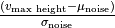 .
.error
Error flag
Indicates any computational errors during property calculation. 0 for no error, 1 for error.
- Return type:
Optional[int]- Returns:
An integer indicating the status (e.g., 2 for existing results) or None if the process completes.
- static cleanup_mmap(file_path)
Closes the memory-mapped object and deletes the associated file.
- Parameters:
mmap_obj – The memory-mapped object to be closed.
file_path – The file path of the memory-mapped file.
- run(loc=None, exclude_border=0, threshold=None, use_smoothing=True, smooth_radius=2, smooth_sigma=2, use_spatial=True, spatial_min_ratio=1, spatial_z_depth=1, use_temporal=True, temporal_prominence=10, temporal_width=3, temporal_rel_height=0.9, temporal_wlen=60, temporal_plateau_size=None, comb_type='&', fill_holes=True, area_threshold=10, holes_connectivity=1, holes_depth=1, remove_objects=True, min_size=20, object_connectivity=1, objects_depth=1, fill_holes_first=True, lazy=True, adjust_for_noise=False, z_slice=None, split_events=False, debug=False, event_map_export_format='.tiff', parallel=True, use_on_disk_sharing=False) Path
Executes the AstroCAST event detection algorithm on a specified video dataset.
- Parameters:
loc (
Optional[str] (default:None)) – Identifier of the dataset within an HDF5 file.exclude_border (
int(default:0)) – Exclude the border pixels to mitigate motion correction artifacts.threshold (
Union[int,float,None] (default:None)) – Absolute value for simple thresholding; uses automatic thresholding if None.use_smoothing (
bool(default:True)) – Apply Gaussian smoothing to enhance events while preserving spatial features.smooth_radius (
int(default:2)) – Radius for the Gaussian smoothing kernel.smooth_sigma (
int(default:2)) – Sigma value for the Gaussian smoothing kernel.use_spatial (
bool(default:True)) – Enable spatial thresholding based on the mean fluorescence ratio.spatial_min_ratio (
Union[int,float] (default:1)) – Minimum ratio of active to inactive pixels for spatial thresholding.spatial_z_depth (
int(default:1)) – Number of frames considered for automatic spatial thresholding.use_temporal (
bool(default:True)) – Enable temporal thresholding to identify active pixels in timeseries.temporal_prominence (
Union[int,float] (default:10)) – Minimum prominence of peaks for temporal thresholding.temporal_width (
int(default:3)) – Minimum width of peaks to exclude short-duration noise.temporal_rel_height (
Union[int,float] (default:0.9)) – Defines boundaries of events relative to peak height.temporal_wlen (
int(default:60)) – Window length for prominence calculation in temporal thresholding.temporal_plateau_size (
Optional[int] (default:None)) – Minimum size of a plateau to be considered an event.comb_type (
Literal['&','|'] (default:'&')) – Combination type for spatial and temporal thresholding (’&’ or ‘|’).fill_holes (
bool(default:True)) – Apply morphological operations to fill holes in detected events.area_threshold (
int(default:10)) – Maximum size of holes to be filled.remove_objects (
bool(default:True)) – Apply morphological operations to remove small objects.objects_depth (
int(default:1)) – Number of frames considered for automatic object removal.min_size (
int(default:20)) – Minimum size of an event region for inclusion in the results.holes_depth (
int(default:1)) – Number of frames considered for automatic temporal thresholding.holes_connectivity (
int(default:1)) – Modifies shape of the element used to fill holes.object_connectivity (
int(default:1)) – Modifies shape of the element used to remove small objects.fill_holes_first (
bool(default:True)) – Determines whether holes are filled before removing small objects.lazy (
bool(default:True)) – Implement lazy loading of data for efficient memory usage.adjust_for_noise (
bool(default:False)) – Adjust event detection for background noise, used with threshold.z_slice (
Optional[Tuple[int,int]] (default:None)) – Selection of frames that are processed.split_events (
bool(default:False)) – Experimental feature to split incorrectly connected events.event_map_export_format (
Literal['.tiff','.h5','.tdb'] (default:'.tiff')) – Suffix of the output file for the event map.debug (
bool(default:False)) – Enable debug mode to export intermediary steps for troubleshooting.parallel (
bool(default:True)) – Enable parallel execution for event characterization.use_on_disk_sharing (default:
False) – Flag to toggle between on-disk (mmap) and in-RAM (shared memory) methods.
- Return type:
Path
Warning
The use_on_disk_sharing parameter enables the use of on-disk memory mapping (mmap) instead of in-RAM shared memory. While this method ensures compatibility in environments where in-RAM sharing (e.g., Docker containers) may cause crashes, it is generally slower due to disk I/O operations. Use this method if you encounter issues with shared memory, particularly in containerized environments.
Note
Smoothing parameters (sigma and radius) enhance events while preserving spatial features.
Spatial and temporal thresholding classify pixels as active, potentially belonging to astrocytic events.
Outputs include the event map, time map, and metadata, saved in specified formats.
Debug mode is useful for troubleshooting unsatisfactory event detection results.
astrocast.helper module
- class astrocast.helper.CachedClass(cache_path=None, logging_level=20)
Bases:
object- print_cache_path(**kwargs)
- class astrocast.helper.DummyGenerator(num_rows=25, trace_length=12, ragged=False, offset=0, min_length=2, n_groups=None, n_clusters=None)
Bases:
object- get_array()
- get_by_name(name, param={})
- get_dask(chunks=None)
- static get_data(num_rows, trace_length, ragged, offset, min_length)
- get_dataframe()
- get_events()
- get_list()
- class astrocast.helper.EventSim
Bases:
object- create_dataset(h5_path, loc='dff/ch0', debug=False, shape=(50, 100, 100), z_fraction=0.2, xy_fraction=0.1, gap_space=5, gap_time=3, event_intensity=100, background_noise=1, blob_size_fraction=0.05, event_probability=0.2)
- static create_random_blob(section, min_gap=1, blob_size_fraction=0.2, event_num=1)
Generate a random blob of connected shape in a given array.
- Parameters:
shape (tuple) – The shape of the array (depth, rows, cols).
min_gap (int, optional) – The minimum distance of the blob to the edge of the array. Default is 1.
blob_size_fraction (float, optional) – The average size of the blob as a fraction of the total array size. Default is 0.2.
event_num (int, optional) – The value to assign to the blob pixels. Default is 1.
- Returns:
The array with the generated random blob.
- Return type:
numpy.ndarray
- Raises:
None –
- simulate(shape, z_fraction=0.2, xy_fraction=0.1, gap_space=5, gap_time=3, event_intensity='incr', background_noise=None, blob_size_fraction=0.05, event_probability=0.2, skip_n=5)
Simulate the generation of random blobs in a 3D array.
- Parameters:
shape (tuple) – The shape of the 3D array (depth, rows, cols).
z_fraction (float, optional) – The fraction of the depth dimension to be covered by the blobs. Default is 0.2.
xy_fraction (float, optional) – The fraction of the rows and columns dimensions to be covered by the blobs. Default is 0.1.
gap_space (int, optional) – The minimum distance between blobs along the rows and columns. Default is 1.
gap_time (int, optional) – The minimum distance between blobs along the depth dimension. Default is 1.
blob_size_fraction (float, optional) – The average size of the blob as a fraction of the total array size. Default is 0.05.
event_probability (float, optional) – The probability of generating a blob in each section. Default is 0.2.
- Returns:
The 3D array with the generated random blobs. int: The number of created events.
- Return type:
numpy.ndarray
- Raises:
None –
- static split_3d_array_indices(arr, cz, cx, cy, skip_n)
Split a 3D array into sections based on the given segment lengths while skipping initial and trailing frames in z-dimension.
- Parameters:
arr (numpy.ndarray) – The 3D array to split.
cz (int) – The length of each section along the depth dimension.
cx (int) – The length of each section along the rows dimension.
cy (int) – The length of each section along the columns dimension.
skip_n (int) – Number of initial and trailing frames to skip in z-dimension.
- Returns:
- A list of tuples representing the start and end indices for each section.
Each tuple has the format (start_z, end_z, start_x, end_x, start_y, end_y).
- Return type:
list
- Raises:
None –
Note
This function assumes that the segment lengths evenly divide the array dimensions. If the segment lengths do not evenly divide the array dimensions, a warning message is logged.
- class astrocast.helper.Normalization(data, inplace=True)
Bases:
object- static diff(data)
- divide(data, mode='max', population_wide=False, rows=True)
- static get_value(data, mode, population_wide=False, axis=1)
- static impute_nan(data, fixed_value=None)
- mean_std()
- min_max()
- run(instructions)
- subtract(data, mode='min', population_wide=False, rows=True)
- class astrocast.helper.SampleInput(test_data_dir='./testdata/')
Bases:
object- get_dir()
- get_loc(ref=None)
- get_test_data(extension='.h5')
- astrocast.helper.download_pretrained_models(save_path)
- astrocast.helper.download_sample_data(save_path, public_datasets=True, custom_datasets=True)
- astrocast.helper.experimental(func)
Decorator to mark functions as experimental and log a warning upon their usage.
- Parameters:
func (Callable) – The function to be decorated.
- Returns:
The decorated function with a warning.
- Return type:
Callable
- astrocast.helper.get_data_dimensions(data, loc=None, return_dtype=False) Tuple[Tuple, Tuple] | Tuple[Tuple, Tuple, type]
- Takes an input object and returns the shape and chunksize of the data it represents. Optionally
the chunksize can be returned as well.
- Parameters:
data (
Union[ndarray,Array,str,Path]) – An object representing the data whose dimensions are to be calculated.loc (
Optional[str] (default:None)) – A string representing the location of the data in the HDF5 file. This parameter is optional and only applicable when data is a Path to an HDF file.return_dtype (
bool(default:False)) – A boolean indicating whether to return the data type of the data.
- Raises:
TypeError – If the input is not of a recognized type.
- Return type:
Union[Tuple[Tuple,Tuple],Tuple[Tuple,Tuple,type]]
- astrocast.helper.is_docker()
- astrocast.helper.is_ragged(data)
- astrocast.helper.load_yaml_defaults(yaml_file_path)
Load default values from a YAML file.
- astrocast.helper.wrapper_local_cache(f)
Wrapper that creates a local save of the function call based on a hash of the arguments expects a function from a class with ‘lc_path’::pathlib.Path and ‘local_cache’:bool attribute
- Parameters:
f –
- Returns:
astrocast.preparation module
- class astrocast.preparation.Delta(data, loc='')
Bases:
objectProvides methods for bleach correction of input data.
- Parameters:
data (
Union[str,Path,ndarray,Array]) – The input data to be processed.loc (
str(default:'')) – The location of the data in the HDF5 file. This parameter is optional and only applicable when data has the .h5 extension.
Example:
delta = Delta('/path/to/input.h5', loc="data/ch0")
delta.run(window=10, method="dF")
delta.save(output_path='/path/to/input.h5', loc="df/ch0", chunk_strategy="balanced", compression="gzip")
- run(window, method='dF', chunk_strategy='Z', chunks=None, overwrite_first_frame=True) ndarray | Array
Performs bleach correction on the input data using specified methods and parameters.
- Parameters:
window (
int) – The size of the window for the minimum filter.method (
Literal['background','dF','dFF'] (default:'dF')) – The method to use for delta calculation.chunk_strategy (
Literal['balanced','XY','Z'] (default:'Z')) – Strategy to infer appropriate chunk sizechunks (default:
None) – User-defined chunk size (ignores inference strategy).overwrite_first_frame (
bool(default:True)) – A flag indicating whether to overwrite the values of the first frame with the second frame after delta calculation.
- Raises:
ValueError – If the input data type is not recognized.
- Return type:
Union[ndarray,Array]
Notes
The function supports different types of input data, including numpy arrays, file paths (specifically .tdb and .h5 files), and Dask arrays. It also handles parallel execution for large datasets, especially when input is a .tdb file.
Warning
For .tdb files as input, this function will overwrite the provided file.
- save(output_path, loc='df', chunk_strategy='balanced', chunks=None, compression=None, overwrite=False)
Saves the result data to a specified file.
This method wraps the functionality of the IO class’s save method, allowing for saving the data in different chunk strategies and with various compression methods.
- Parameters:
output_path (
Union[str,Path]) – Path to the file where the data will be saved.loc (
str(default:'df')) – The dataset name within the HDF5 file to store the data.chunk_strategy (
Literal['balanced','XY','Z'] (default:'balanced')) – Strategy to infer appropriate chunk size when saving.chunks (
Optional[Tuple[int,int,int]] (default:None)) – User-defined chunk size. Ignores chunk_strategy.compression (
Optional[Literal['gzip','szip','lz4']] (default:None)) – Compression method to use for storing the data.overwrite (
bool(default:False)) – Whether to overwrite the file if it already exists.
Note
The ‘loc’ parameter defaults to ‘df’, and the ‘chunk_strategy’ defaults to ‘balanced’. If ‘chunks’ is not specified, the method will infer appropriate chunk sizes based on the strategy. The ‘overwrite’ flag is set to False by default, ensuring that existing files are not overwritten unless explicitly intended.
- class astrocast.preparation.IO
Bases:
object- static exists_and_clean(path, loc='', overwrite=False)
- static infer_chunks(shape, dtype, strategy='balanced', chunk_bytes=1000000, chunks=None)
Infer the chunks for the input data.
- infer_chunks_from_array(arr, strategy='balanced', chunk_bytes=1000000, chunks=None)
- load(path, loc='', sep='_', z_slice=None, lazy=False, chunk_strategy='balanced', chunks=None) ndarray | Array
Loads data from a specified file or directory.
- Parameters:
path (
Union[str,Path]) – The path to the file or directory.loc (
str(default:'')) – The location of the dataset in an HDF5 file.sep (
str(default:'_')) – Separator used for sorting file names.z_slice (
Optional[Tuple[int,int]] (default:None)) – Range of frames that are selective loaded.lazy (True (default:
False)) – Flag to load the data on demand or to memory (lazy = False).chunk_strategy (
Literal['balanced','XY','Z'] (default:'balanced')) – Strategy to infer the chunks.chunks (
Optional[Tuple[int,int,int]] (default:None)) – User-defined chunk size. Ignores chunk_strategy if provided.
- Raises:
ValueError – If the file format is not recognized.
FileNotFoundError – If the specified file or folder cannot be found.
- Return type:
Union[ndarray,Array]
- save(path, data, loc=None, chunks=None, chunk_strategy='balanced', compression=None, overwrite=False) str | Path | List[str]
Save data to a specified file format.
- Parameters:
path (
Union[str,Path]) – The path to the output file.data (
Union[ndarray,Array,dict]) – Data in numpy/dask array format or a dictionary {‘channel name’: arr}.loc (
Optional[str] (default:None)) – Name of the dataset within the file (applicable only for HDF5 format).chunk_strategy (
Literal['balanced','XY','Z'] (default:'balanced')) – Strategy utilized to find optimal chunk sizes.chunks (
Optional[Tuple[int,int,int]] (default:None)) – User-defined chunk size. Ignores chunk_strategy if provided.compression (
Optional[Literal['gzip','szip','lz4']] (default:None)) – The compression method to be used when saving Dask arrays.overwrite (
bool(default:False)) – Flag to toggle overwriting of existing files.
- Returns:
A list containing the paths of the saved files.
- Return type:
list
- Raises:
TypeError – If the provided path is not a string or pathlib.Path object.
TypeError – If the provided data is not a dictionary.
TypeError – If the provided data is not in a supported format.
- static sort_alpha_numerical_names(file_names, sep='_')
Sorts a list of file names in alphanumeric order based on a given separator.
- Parameters:
file_names (list) – A list of file names to be sorted.
sep (str, optional) – Separator used for sorting file names. (default: “_”)
- Returns:
A sorted list of file names.
- Return type:
list
- Raises:
None –
- class astrocast.preparation.Input(logging_level=20)
Bases:
objectClass for loading time series images and converting to an astroCAST compatible format.
- Parameters:
logging_level (
int(default:20)) – Sets the level at which information is logged to the console as an integer value. The built-in levels in the logging module are, in increasing order of severity: debug (10), info (20), warning (30), error (40), critical (50).
Example:
inp = Input()
inp.run('path/to/images', output_path='path/to/output.h5' channels=1, loc_out='data')
- run(input_path, output_path=None, sep='_', channels=1, z_slice=None, lazy=True, subtract_background=None, subtract_func='mean', rescale=None, dtype=<class 'int'>, in_memory=False, loc_in=None, loc_out='data', chunk_strategy='balanced', chunks=None, compression=None) ndarray | dict
Loads input data from a specified path, performs data processing, and optionally saves the processed data.
- Parameters:
input_path (
Union[str,Path]) – Path to the input file or directory.output_path (
Union[str,Path,None] (default:None)) – Path to save the processed data. If None, the processed data is returned.loc_in (
Optional[str] (default:None)) – Input dataset in the HDF5 file that is loaded.loc_out (
str(default:'data')) – Output dataset in the HDF5 file that is saved.z_slice (
Optional[Tuple[int,int]] (default:None)) – Selection of frames that are processed.sep (
str(default:'_')) – Separator used for sorting file names, [‘file_01.tiff’, ‘file_02.tiff’].channels (
Union[int,dict] (default:1)) – Number of channels or dictionary specifying channel names.subtract_background (
Union[str,ndarray,None] (default:None)) – Either channel name or array that is subtracted.subtract_func (
Union[Literal['mean','max','min','std'],Callable] (default:'mean')) – Function to use for background subtraction.rescale (
Union[float,Tuple[int,int],None] (default:None)) – Scale factor or tuple specifying the new dimensions.dtype (
type(default:<class 'int'>)) – Data type to convert the processed data.in_memory (
bool(default:False)) – If True, the processed data is loaded into memory.chunk_strategy (
Literal['balanced','XY','Z'] (default:'balanced')) – Strategy to use when inferring size of chunks.chunks (
Optional[Tuple[int,int,int]] (default:None)) – Chunk size to use when saving to HDF5 or TileDB.compression (
Optional[Literal['gzip','szip','lz4']] (default:None)) – Compression method to use when saving to HDF5 or TileDB.lazy (
bool(default:True)) – If True, the data is loaded on demand.
- Return type:
Union[ndarray,dict]
- class astrocast.preparation.MotionCorrection(working_directory=None, logging_level=20)
Bases:
objectClass for performing motion correction based on the Jax-accelerated implementation of NoRMCorre.
- Parameters:
working_directory (
Union[str,Path,None] (default:None)) – Working directory for temporary files. If not provided, the temporary directory is created.logging_level (
int(default:20)) – Sets the level at which information is logged to the console as an integer value. The built-in levels in the logging module are, in increasing order of severity: debug (10), info (20), warning (30), error (40), critical (50).
Note
For more information see the accelerated (used here), original implementation and the associated publication Pnevmatikakis et al. 2017 [1]
Caution
Non-rigid motion correction is not always necessary. Sometimes, rigid motion correction will be sufficient, and it will lead to significant performance gains in terms of speed. Check your data before and after rigid motion correction to decide what is best (pw_rigid flag; see below).
Example:
mc = MotionCorrection()
mc.run('path/to/file.h5', loc='data/ch0')
mc.save(output='path/to/file.h5', loc='mc/ch0')
Footnotes
- run(path, loc='', max_shifts=(50, 50), niter_rig=3, splits_rig=14, num_splits_to_process_rig=None, strides=(48, 48), overlaps=(24, 24), pw_rigid=False, splits_els=14, num_splits_to_process_els=None, upsample_factor_grid=4, max_deviation_rigid=3, nonneg_movie=True, gSig_filt=(20, 20), bigtiff=True) None
Reduces motion artifacts by performing piecewise rigid motion correction.
- Parameters:
path (
Union[str,Path]) – The input data to be motion corrected.loc (
str(default:'')) – The dataset name in the .h5 file the data is stored in. Only relevant if path is an .h5 file.max_shifts (
Tuple[int,int] (default:(50, 50))) – A tuple specifying the maximum allowed rigid shift in pixels.niter_rig (
int(default:3)) – The maximum number of iterations for rigid motion correction. More iterations can improve motion correction quality, but increases runtime.splits_rig (
int(default:14)) – The number of splits to parallelize the motion correction for rigid correction.num_splits_to_process_rig (
Optional[int] (default:None)) – A list specifying the number of splits to process at each iteration for rigid correction.strides (
Tuple[int,int] (default:(48, 48))) – A tuple specifying the intervals at which patches are laid out for motion correction.overlaps (
Tuple[int,int] (default:(24, 24))) – A tuple specifying the overlaps between patches for motion correction.pw_rigid (
bool(default:False)) – A boolean indicating whether to perform piecewise or standard rigid motion correction.splits_els (
int(default:14)) – The number of splits to parallelize the motion correction for elastic correction.num_splits_to_process_els (
Optional[int] (default:None)) – A list specifying the number of splits to process at each iteration for elastic correction.upsample_factor_grid (
int(default:4)) – The upsample factor for the grid in elastic motion correction.max_deviation_rigid (
int(default:3)) – The maximum deviation from rigid motion allowed in pixels.nonneg_movie (
bool(default:True)) – A boolean indicating whether to enforce non-negativity in the motion corrected movie.gSig_filt (
Tuple[int,int] (default:(20, 20))) – A tuple specifying the size of the Gaussian filter for filtering the movie.bigtiff (
bool(default:True)) – A boolean indicating whether to save the motion corrected movie as a BigTIFF file. Prevents errors when correcting videos dimensions exceeding the capabilities of the standard tiff format.
- Return type:
None
- save(output=None, loc='mc/ch0', chunk_strategy='balanced', chunks=None, compression=None, remove_intermediate=True) ndarray | None
Retrieve the motion-corrected data and optionally save it to a file.
- Parameters:
output (
Union[str,Path,None] (default:None)) – Output file path where the data should be saved.loc (
str(default:'mc/ch0')) – Location within the HDF5 file to save the data (required when output is an HDF5 file).chunk_strategy (
Literal['balanced','XY','Z'] (default:'balanced')) – Chunk strategy to use when saving to an HDF5 file.chunks (
Optional[Tuple[int,int,int]] (default:None)) – Chunk shape for creating a dask array when saving to an HDF5 file.compression (
Optional[Literal['gzip','lzf','szip']] (default:None)) – Compression algorithm to use when saving to an HDF5 file.remove_intermediate (
bool(default:True)) – Whether to remove the intermediate files associated with motion correction after retrieving the data.
- Return type:
Optional[ndarray]
Notes
This method should be called after motion correction is completed by using the run() function.
If output is specified, the motion-corrected data is saved to the specified file using the IO class.
If remove_intermediate is set to True, the mmap file associated with motion correction is deleted after retrieving the data.
- class astrocast.preparation.XII(file_path, dataset_name, num_channels=1, sampling_rate=None, channel_names=None)
Bases:
object- static align(video, timing, idx_channel=0, num_channels=2, offset_start=0, offset_stop=0)
- detrend(dataset_name, window=25, inplace=True)
- get_camera_timing(dataset_name, downsample=100, prominence=0.5)
- static load_xii(file_path, dataset_name, num_channels=1, sampling_rate=None, channel_names=None)
- show(dataset_name, mapping, viewer=None, viewer1d=None, down_sample=100, colormap=None, window=160, y_label='XII', x_label='step')
astrocast.reduction module
- class astrocast.reduction.ClusterTree(Z)
Bases:
objectconverts linkage matrix to searchable tree
- get_count(tree)
- get_leaves(tree)
- get_node(id_)
- is_leaf()
Determines if the given node is a leaf in the tree.
- Parameters:
tree (ClusterNode) – The node to check.
- Returns:
True if the node is a leaf, False otherwise.
- Return type:
bool
- search(tree, id_)
- class astrocast.reduction.FeatureExtraction(events, cache_path=None, logging_level=20)
Bases:
CachedClass- Parameters:
events (
Events) –
- abs_energy(X)
absolute sum of squares for each variable
- abs_sum(X)
sum of absolute values
- all_features(**kwargs)
- cid_ce(X, normalize=True)
This function calculator is an estimate for a time series complexity [1] (A more complex time series has more peaks, valleys etc.). It calculates the value of
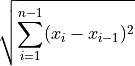
References
[1] Batista, Gustavo EAPA, et al (2014).CID: an efficient complexity-invariant distance for time series.Data Mining and Knowledge Discovery 28.3 (2014): 634-669.- Parameters:
x (numpy.ndarray) – the time series to calculate the feature of
normalize (bool) – should the time series be z-transformed?
- Returns:
the value of this feature
- Return type:
float
- emg_var(X)
variance (assuming a mean of zero) for each variable in the segmented time series (equals abs_energy divided by (seg_size - 1))
- gmean(X)
geometric mean for each variable
- hmean(X)
harmonic mean for each variable
- kurt(X)
kurtosis for each variable in a segmented time series
- large_standard_deviation(x, r=0.5)
Does time series have large standard deviation?
Boolean variable denoting if the standard dev of x is higher than ‘r’ times the range = difference between max and min of x. Hence it checks if

According to a rule of the thumb, the standard deviation should be a forth of the range of the values.
- Parameters:
x (numpy.ndarray) – the time series to calculate the feature of
r (float) – the percentage of the range to compare with
- Returns:
the value of this feature
- Return type:
bool
- longest_strike_above_mean(x)
Returns the length of the longest consecutive subsequence in x that is bigger than the mean of x
- Parameters:
x (numpy.ndarray) – the time series to calculate the feature of
- Returns:
the value of this feature
- Return type:
float
- longest_strike_below_mean(x)
Returns the length of the longest consecutive subsequence in x that is smaller than the mean of x
- Parameters:
x (numpy.ndarray) – the time series to calculate the feature of
- Returns:
the value of this feature
- Return type:
float
- maximum(X)
maximum value for each variable in a segmented time series
- mean(X)
statistical mean for each variable in a segmented time series
- mean_abs(X)
statistical mean of the absolute values for each variable in a segmented time series
- mean_crossings(X)
Computes number of mean crossings for each variable in a segmented time series
- mean_diff(X)
mean temporal derivative
- means_abs_diff(X)
mean absolute temporal derivative
- median(X)
statistical median for each variable in a segmented time series
- median_absolute_deviation(X)
median absolute deviation for each variable in a segmented time series
- minimum(X)
minimum value for each variable in a segmented time series
- mse(X)
computes mean spectral energy for each variable in a segmented time series
- percentage_of_reoccurring_datapoints_to_all_datapoints(x)
Returns the percentage of non-unique data points. Non-unique means that they are contained another time in the time series again.
# of data points occurring more than once / # of all data points
This means the ratio is normalized to the number of data points in the time series, in contrast to the percentage_of_reoccurring_values_to_all_values.
- Parameters:
x (numpy.ndarray) – the time series to calculate the feature of
- Returns:
the value of this feature
- Return type:
float
- root_mean_square(X)
root mean square for each variable in the segmented time series
- shannon_entropy(X, b=2)
- skew(X)
skewness for each variable in a segmented time series
- slope_sign_changes(X, threshold=0)
number of changes between positive and negative slope among three consecutive samples above a certain threshold for each variable in the segmented time series
- std(X)
statistical standard deviation for each variable in a segmented time series
- symmetry_looking(x, r=0.5)
Boolean variable denoting if the distribution of x looks symmetric. This is the case if

- Parameters:
x (numpy.ndarray) – the time series to calculate the feature of
param (list) – contains dictionaries {“r”: x} with x (float) is the percentage of the range to compare with
- Returns:
the value of this feature
- Return type:
bool
- var(X)
statistical variance for each variable in a segmented time series
- variance_larger_than_standard_deviation(x)
Is variance higher than the standard deviation?
Boolean variable denoting if the variance of x is greater than its standard deviation. Is equal to variance of x being larger than 1
- Parameters:
x (numpy.ndarray) – the time series to calculate the feature of
- Returns:
the value of this feature
- Return type:
bool
- variation(X)
coefficient of variation
- vec_sum(X)
vector sum of each variable
- waveform_length(X)
cumulative length of the waveform over a segment for each variable in the segmented time series
- willison_amplitude(X, threshold=0)
the Willison amplitude for each variable in the segmented time series
- zero_crossing(X, threshold=0)
number of zero crossings among two consecutive samples above a certain threshold for each variable in the segmented time series